When searching for 3d printers, the options can feel overwhelming with a wide range of features, prices, and capabilities. The Best Overall pick, the Bambu Lab A1, offers a balanced mix of performance and ease of use suitable for most users. For those prioritizing speed, the Creality K2 SE delivers impressive high-speed printing, while beginners might prefer the Entina Tina2C for its fully assembled, user-friendly design. Each model involves tradeoffs—higher speed often means higher cost or complexity, while simpler models may lack advanced features. Keep reading for a detailed breakdown of these options to find the best fit for your needs.

Get your wardrobe favorites delivered free with Prime
- Fast, free delivery on millions of items
- Prime Video, Amazon Music and more included
- Member-only deals all year
Complete the kit


Key Takeaways
- The top-ranked models balance ease of use with professional features, making them versatile for a wide range of users.
- Speed and multi-material support are often found in higher-end or specialized printers, but they can significantly increase cost.
- Auto-leveling and fully assembled designs are key features for beginners who want quick setup and minimal maintenance.
- Multi-color and multi-material capabilities are mostly reserved for premium models, which may not be necessary for casual users.
- Build size varies widely; choosing the right volume depends on your typical print projects and space constraints.






| 3d printer | Item Weight |
|---|---|
| Bambu Lab A1 3D Printer | 22 pounds |
| Bambu Lab P2S Combo | — |
| ELEGOO Neptune 3 Pro 3D Printe | — |
| Entina Tina2C 3D Printer for K | — |
| Creality K2 SE 3D Printer | — |
| Bambu Lab P1S Combo 3D Printer | 47.5 pounds |
| FlashForge Adventurer 5M 3D Pr | 22 pounds |
| Bambu Lab A1 Mini 3D Printer + | 12.1 pounds |
| Bambu Lab P1S 3D Printer | 38.9 pounds |
| FlashForge AD5X Multi-Color 3D | — |
| FLASHFORGE Adventurer 5M 3D Pr | 23.8 pounds |
| Creality K2 Combo | — |
| FLASHFORGE Creator 5 Pro 3D Pr | 39 pounds |
| Creality SPARKX i7 3D Printer | — |
More Details on Our Top Picks
Bambu Lab A1 3D Printer, Ready-to-Use FDM 3D Printer for Beginners and Kids
The Bambu Lab A1 stands out for its combination of high-speed, precise printing and user-friendly features, making it ideal for newcomers and young users. Its automatic calibration and active flow rate compensation ensure reliable first layers, while the quiet operation keeps it unobtrusive in home environments. Compared with the Eleego Neptune 3 Pro, it offers less build volume but excels in ease of use and multi-color support via the optional AMS lite, which is perfect for small projects or educational settings. The main tradeoff is that multi-color printing requires an additional purchase, and its larger footprint might be a concern for tight spaces.
Pros:- High-speed and precise printing with automatic calibration
- Supports multi-color with optional AMS lite
- Quiet operation with active motor noise canceling
Cons:- Requires AMS lite for multi-color printing (additional cost)
- Relatively large footprint may not fit small spaces
Best for: beginners, kids, or families wanting straightforward, multi-color capable 3D printing at home
Not ideal for: advanced users seeking large build volumes or complex multi-material setups without additional accessories
- Product Dimensions:21.76 x 20.83 x 12.87 inches
- Item Weight:22 pounds
- Date First Available:May 17, 2024
Our verdict“This printer best suits beginners and kids who prioritize ease of use and multi-color capabilities on a smaller scale.”
Bambu Lab P2S Combo, P2S 3D Printer & AMS 2 Pro, Multi-Color 3D Printing
The Bambu Lab P2S Combo excels in delivering ultra-fast printing speeds up to 600 mm/s, combined with automatic calibration and a streamlined workflow suitable for both hobbyists and professionals. Its AMS 2 Pro module facilitates seamless multi-color and multi-material printing, with features like filament drying and smart airflow that optimize results. Compared to the Creality K2 SE, which offers high speed but lacks integrated multi-color support, the P2S Combo provides a more comprehensive multi-material experience, though its complex features may overwhelm complete beginners. Setup time is quick, but some functions, like filament drying, might require extra attention.
Pros:- Extremely fast printing at 600 mm/s with high accuracy
- Quick setup and automatic calibration
- Seamless multi-color/multi-material printing with AMS 2 Pro
- Smart airflow and filament drying enhance quality
Cons:- Multi-color support requires the full Combo setup, increasing cost
- Complex features might be challenging for new users
Best for: advanced makers, professionals, or users who need high-speed, multi-material capabilities
Not ideal for: beginners who prefer simple, plug-and-play setups without the complexity of advanced features
- Print Speed:600 mm/s
- Setup Time:15 minutes
- Filament Drying Temperature:65 °C
- Chamber Temperature:50 °C
- Airflow System:Adaptive Airflow System
Our verdict“This model is best for users needing rapid, multi-material production with minimal fuss once set up.”
ELEGOO Neptune 3 Pro 3D Printer, Quick Assembly with Auto Leveling
The ELEGOO Neptune 3 Pro offers a reliable, easy-to-assemble option with auto bed leveling and a decent build volume of 225x225x280 mm. Its direct drive extruder supports a variety of filaments such as PLA, TPU, PETG, and ABS, making it versatile for many applications. Compared with the Creality K2 SE, it provides a slightly smaller but more straightforward setup, ideal for users who want reliable results without complex multi-color features. Auto bed leveling ensures consistent first layers, though the noise level at 47dB might still bother quiet environments, and the limited build volume restricts larger projects.
Pros:- Quick assembly with pre-assembled parts
- Auto bed leveling for consistent quality
- Supports multiple filament types
Cons:- Noise level may be noticeable in quiet spaces
- Limited build volume for larger models
Best for: small-scale hobbyists or educational users needing dependable, easy-to-use printer
Not ideal for: users aiming for large or multi-color multi-material projects requiring more advanced features
- Build Volume:225x225x280 mm
- Motherboard:STM32
- Noise Level:47dB
- Supported Filaments:PLA, TPU, PETG, ABS
- Auto Bed Leveling:36-point
Our verdict“Ideal for users seeking a straightforward, reliable printer for small projects and educational purposes.”
Entina Tina2C 3D Printer for Kids & Beginners, Fully Assembled Mini 3D Printer with App & WiFi Control
The Entina Tina2C is designed specifically for beginners and children, emphasizing simplicity and quick setup—just 8 minutes to start printing. Its compact size and WiFi connectivity make it ideal for home or classroom use. While it offers auto leveling and a self-cleaning nozzle, the tiny 3.9-inch cube build volume limits larger projects. Compared to the Bambu Lab A1, which supports multi-color and larger builds, the Tina2C prioritizes ease and accessibility over versatility. The main tradeoff is the small print volume, which restricts what can be created, and the need for app setup that may challenge some users.
Pros:- Quick and easy setup in 8 minutes
- WiFi and app control for flexible operation
- Compact design suitable for home or classroom
Cons:- Limited print volume restricts larger projects
- Requires app and software setup, which may be confusing for some
Best for: kids, beginners, or educators seeking an easy-to-use, WiFi-enabled 3D printer for small models
Not ideal for: users wanting to print larger objects or multi-color multi-material parts without additional hardware
- Print Volume:3.9 x 3.9 x 3.9 inches
- Connectivity:WiFi, TF card
- Supported OS:Windows, macOS, Linux, Chromebook
- Features:Auto leveling, self-cleaning nozzle
Our verdict“This mini printer is perfect for beginners and kids focused on small, simple models and STEM activities.”
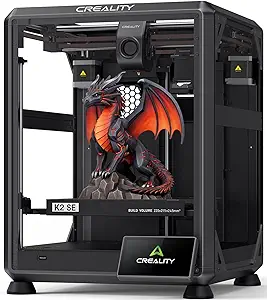
Creality K2 SE 3D Printer, 500mm/s High-Speed, Multi-Color Support, Auto Leveling, Solid Metal Build, 220×215×245mm Print Size
The Creality K2 SE delivers impressive speeds up to 500mm/s, thanks to vibration reduction technology and a sturdy metal frame that promotes stability. Its auto bed leveling simplifies setup, and support for multi-color printing via the CFS system adds versatility for multi-colored models. Compared with the Bambu Lab A1, which is more beginner-friendly, the K2 SE provides a more robust build and faster speeds but involves a steeper learning curve, especially as the multi-color system requires a separate purchase. Its smaller print size makes it suitable for detailed small to medium projects, but larger builds may be limited.
Pros:- Speed up to 500mm/s for rapid prototyping
- Automatic bed leveling for quick setup
- Solid metal frame for stability and precision
- Supports multi-color with CFS system
Cons:- Full multi-color support requires additional purchase of CFS system
- Advanced features may have a learning curve for newcomers
Best for: users wanting high-speed printing and multi-color capabilities for small to medium projects
Not ideal for: beginners or users seeking large build volumes or straightforward multi-color printing without additional systems
- Print Speed:500 mm/s
- Build Volume:220×215×245 mm
- Frame Material:Die-cast aluminum alloy
- Auto Leveling:Yes
- Supported Filament Presets:40+
Our verdict“This printer is best suited for experienced users who need speed and multi-color options in a compact size.”
Bambu Lab P1S Combo 3D Printer with Multi-Color Printing and Auto Bed Leveling
The Bambu Lab P1S Combo stands out for its ability to handle multi-color and multi-material printing, making it ideal for complex, vibrant designs. Unlike the Bambu Lab P1S, which offers a more streamlined single-material workflow, this combo supports up to 16 colors, enabling intricate color transitions. The high-speed capability of 500mm/s reduces production time, but it requires connection to the Bambu Lab AMS for multi-color features, adding setup complexity. Its enclosed design enhances print quality with advanced filaments, yet its weight of nearly 50 pounds means a sturdy, dedicated space is necessary. This model is best suited for hobbyists and small production shops wanting creative flexibility, but it’s less ideal for users needing carbon fiber or glass fiber compatibility due to filament limitations.
Pros:- Supports multi-color and multi-material printing for detailed color work
- High-speed printing reduces project turnaround times
- Automatic bed leveling simplifies setup and increases success rate
- Enclosed design improves print stability with sensitive filaments
Cons:- Requires connection to Bambu Lab AMS for multi-color functionality
- Heavy weight limits placement flexibility
- Not suitable for carbon or glass fiber reinforced filaments
Best for: Enthusiasts seeking vibrant, multi-color prototypes or artistic prints with diverse filament options
Not ideal for: Users requiring fiber-reinforced materials or a lightweight, portable setup
- Product Dimensions:15.31 x 18.03 x 15.31 inches
- Item Weight:47.5 pounds
- Maximum Speed:500mm/s
- Supported Filaments:PLA, PETG, TPU, PVA, PET ABS, ASA; Capable: PA, PC
- Auto Bed Leveling:Yes
- Enclosed Design:Yes
Our verdict“This printer is perfect for artists and small studios prioritizing multi-color printing over portability or fiber compatibility.”
FlashForge Adventurer 5M 3D Printer with Auto Leveling and High-Speed Printing
The FlashForge Adventurer 5M excels in delivering rapid results with its impressive 600mm/s speed, surpassing many competitors like the Bambu Lab P1S in raw speed. Its auto bed leveling makes setup straightforward, especially for beginners, but the moderate customer rating suggests some users face reliability issues or inconsistent print quality. The direct drive extruder reaches 280°C, enabling a variety of filaments, yet its weight of over 22 pounds may hinder portability. Its compact size and remote monitoring via mobile app make it well-suited for busy makers who value quick, reliable prototyping, though those seeking higher precision or advanced multi-material support may find it limiting.
Pros:- Automatic bed leveling simplifies initial setup
- High-speed printing up to 600mm/s for quick project turnaround
- Quick nozzle change and warm-up times enhance workflow
- Remote control via mobile app adds convenience
Cons:- Moderate customer ratings hint at potential reliability issues
- Relatively heavy for frequent repositioning
- Limited detailed user feedback available
Best for: Small workshops or home users needing fast, easy-to-use printing with remote monitoring capability
Not ideal for: Professional users requiring ultra-high precision or multi-material multi-color printing
- Print Size:220x220x220mm
- Max Speed:600mm/s
- Extruder Temperature:280°C
- Nozzle:3S Detachable Nozzle
- Structure:CoreXY All Metal
- Item Weight:22 pounds
Our verdict“This printer is a strong choice for impatient hobbyists and small teams prioritizing speed and ease of use over advanced multi-color features.”
Bambu Lab A1 Mini 3D Printer + LED Lamp Kit, Ready-to-Use for Beginners
The Bambu Lab A1 Mini makes a compelling case for newcomers with its simple setup, automatic calibration, and quiet operation, making it ideal for home environments. Its included LED Lamp Kit enables creative lighting projects, appealing to DIY enthusiasts and decorative crafters. Compared to the more advanced Bambu Lab P1S, it’s limited in build volume and filament options, focusing more on ease than high-end features. The compact size and user-friendly app integration support seamless management, but the limited specifications mean it’s less suited for complex or large-scale printing projects. This model is best for beginners, small craft projects, or personalized gifts, though experienced users seeking multi-material or multi-color capabilities might find it restrictive.
Pros:- Automatic calibration simplifies initial setup
- Quiet operation ideal for domestic use
- Includes LED Lamp Kit for decorative projects
- Access to extensive model library via MakerWorld app
Cons:- Limited technical specifications available
- May lack advanced features for complex multi-material printing
- Availability and pricing can vary
Best for: Beginners, hobbyists, and home decorators interested in simple, reliable printing and creative lighting projects
Not ideal for: Experienced makers needing large build volumes or multi-material multi-color printing
- Product Dimensions:15.21 x 16.77 x 17.94 inches
- Item Weight:12.1 pounds
- Build Volume:Not specified
- Calibration:Automatic
- Operation:Quiet
Our verdict“This printer suits newcomers and casual makers who want straightforward operation and creative light projects without the need for complex features.”
Bambu Lab P1S 3D Printer, Ready-to-Use FDM 3D Printer
The Bambu Lab P1S delivers impressive multi-material and multi-color capabilities, with a maximum speed of 500mm/s that rivals the FlashForge AD5X. Its enclosed design improves print quality by maintaining stable temperatures, and automatic bed leveling simplifies setup for both hobbyists and more experienced users. However, its support for limited filament types—excluding fiber-reinforced materials—may be a drawback for users needing advanced composites. Compared with the FlashForge AD5X, it offers slightly less speed but excels in multi-material handling, making it suitable for serious enthusiasts wanting vibrant, multi-color prints without sacrificing speed. The weight of nearly 39 pounds calls for a dedicated, stable workspace.
Pros:- Vibrant multi-color/multi-material printing capabilities
- Fast printing at 500mm/s enhances productivity
- Automatic bed leveling for easy setup
- Enclosed design improves print stability and quality
Cons:- Limited to non-fiber-reinforced filaments
- Supports fewer filament types compared to some competitors
- Relatively heavy for frequent repositioning
Best for: Intermediate to advanced users who want multi-material, multi-color printing at high speeds
Not ideal for: Users needing fiber-reinforced filament support or portability
- Product Dimensions:15.31 x 18.03 x 15.31 inches
- Item Weight:38.9 pounds
- Maximum Speed:500mm/s
- Supported Filaments:PLA, PETG, TPU, PVA, PET ABS, ASA; Capable: PA, PC
- Auto Bed Leveling:Yes
- Enclosed Design:Yes
Our verdict“Ideal for hobbyists and small studios seeking vibrant, multi-material prints at high speeds, but not suited for fiber-reinforced composites.”
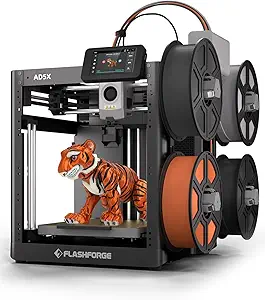
FlashForge AD5X Multi-Color 3D Printer, CoreXY, 600mm/s High-Speed, Auto Leveling, 300°C Extruder, 220x220x220mm Build Volume
The FlashForge AD5X combines blazing-fast 3D printing at 600mm/s with multi-color capability, making it a strong contender for rapid prototyping. Its auto bed leveling ensures consistent success, while the 300°C extruder supports a wide array of filament types, including some flexible and high-temperature materials. The support for multiple nozzle sizes adds versatility for detailed or larger prints. Compared to the Bambu Lab P1S, which emphasizes multi-materials and quiet operation, the AD5X emphasizes speed and multi-color mixing, though its complex setup may challenge less experienced users. The relatively higher price reflects its advanced features, making it ideal for professional rapid prototyping but less suited for casual or hobbyist use.
Pros:- Supports multi-color printing with up to 4 colors simultaneously
- Exceptional high-speed operation for quick turnarounds
- Auto bed leveling and smart features ease workflow
- Multiple nozzle options for detailed or larger prints
Cons:- Complex setup that may require technical skills
- Price point is higher compared to single-color or slower printers
- Potential calibration challenges at maximum speed
Best for: Designers and engineers focused on fast, multi-color prototypes and small batch production
Not ideal for: Beginners or users needing large build volumes or fiber-reinforced filament support
- Build Volume:220x220x220mm
- Max Printing Speed:600mm/s
- Extruder Temperature:300°C
- Nozzle Sizes:0.25mm to 0.8mm
- Auto Leveling:Yes
- Connectivity:Mobile app control
Our verdict“This printer suits professionals and advanced hobbyists who need rapid, multi-color prototyping with high-speed performance but are prepared for a steeper learning curve.”
FLASHFORGE Adventurer 5M 3D Printer, High-Speed, Fully Auto Leveling, Upgraded Direct Extruder, 280°C Nozzle, Dual-Sided PEI Coating Plate, 220x220x220mm
The FLASHFORGE Adventurer 5M stands out for its ability to deliver fast print speeds up to 600mm/s, which significantly reduces production time compared to the Bambu Lab P1S. Its fully automatic bed leveling simplifies setup, making it accessible even for less experienced users. While its 220x220x220mm build size is smaller than the Creality K2 Combo, the tradeoff favors quick, reliable prints over large-volume capacity. The upgraded direct extruder and 280°C nozzle enable printing with a wide range of filaments, expanding creative possibilities. However, its weight of nearly 24 pounds and more complex initial setup can be hurdles for portability and beginners. Overall, it suits those seeking high-speed, reliable printing with minimal manual calibration, but less so for users needing large build volumes or portability.
Pros:- Speeds up to 600mm/s for rapid prototyping
- Automatic bed leveling with one click
- Reliable filament run-out detection and power loss recovery
- Supports multiple filament types including PLA, PETG, TPU
Cons:- Relatively heavy at 23.8 pounds, impacting portability
- Setup can be complex for beginners unfamiliar with 3D printers
Best for: Hobbyists or small studios needing fast turnaround and simple operation
Not ideal for: Large-scale production environments or users requiring extensive build space
- Product Dimensions:14.29 x 15.83 x 17.64 inches
- Item Weight:23.8 pounds
- Print Size:220x220x220mm
- Nozzle Temperature:280°C
- Max Speed:600mm/s
- Heating Power:50W
Our verdict“This printer suits users who prioritize speed and ease of setup over maximum build size or portability.”
Creality K2 Combo (A) 3D Printer, Multicolor Printing with CFS, 600mm/s Speed, Auto Leveling, Smart AI Camera, Next-Gen Direct Drive, 260x260x260mm Build Volume
The Creality K2 Combo (A) offers a standout feature set for multicolor printing, supporting up to 16 colors with four CFS units, a significant advantage over single-color options like the FlashForge Creator 5 Pro. Its auto leveling and AI camera enable precise, real-time monitoring, ideal for complex multi-color or detailed projects. Despite its impressive 260x260x260mm build volume, it is notably heavy at nearly 66 pounds, making mobility difficult. The pre-assembled design simplifies initial setup, but the size and weight demand a dedicated workspace. Its high speed of 600mm/s and quiet operation appeal to professional environments, though limited detailed user feedback may leave some uncertainty about long-term reliability. It’s best suited for advanced users who need multicolor capability and speed in a stable, semi-assembled package.
Pros:- Supports up to 16 colors with four CFS units
- Auto leveling with integrated AI camera for precision
- Pre-assembled for quick setup
- Quiet operation at high speeds
Cons:- Heavy and bulky at 65.9 pounds, challenging to move or store
- Limited detailed review data available, potential unknowns
Best for: Professional makers or production labs focused on multicolor, high-speed projects
Not ideal for: Small hobbyists or those with limited space due to its weight and size
- Build Volume:260 x 260 x 260 mm
- Printing Speed:600 mm/s
- Weight:65.9 pounds
- Item Dimensions:16.93 x 16.54 x 21.06 inches
Our verdict“This printer is tailored for professionals needing multicolor, high-speed printing with minimal setup time but requires ample space and stability.”
FLASHFORGE Creator 5 Pro 3D Printer with 4 Toolheads, Multi-Material & Color Printing, Heated Chamber, CoreXY System
The FLASHFORGE Creator 5 Pro elevates multi-material printing with four independent toolheads, making it ideal for complex, multi-color projects. Its heated chamber up to 65°C supports advanced filaments like ABS and PEEK, a feature that sets it apart from more hobby-oriented models like the Adventurer 5M. The CoreXY motion system enhances precision, while automated calibration and real-time monitoring streamline workflow, though the setup can be daunting for beginners. Its size and weight are significant, requiring dedicated space, but these qualities make it well-suited for professional or industrial environments. The high price reflects its advanced capabilities, which are overkill for casual users but invaluable for demanding applications requiring multi-material complexity and reliable operation.
Pros:- Four independent toolheads for multi-material, multi-color printing
- Heated chamber supports advanced filaments like ABS and PEEK
- Automated calibration and real-time monitoring ensure consistent results
- Quick toolhead swapping reduces waste
Cons:- Heavy and large, demanding significant space
- Complex setup may challenge beginners
- Higher price point for professional investment
Best for: Industrial or professional users needing robust, multi-material, multi-color capabilities
Not ideal for: Hobbyists or small-scale hobby shops lacking dedicated space or technical expertise
- Product Dimensions:16 x 14 x 18 inches
- Item Weight:39 pounds
- Active Heated Chamber:65°C
- Number of Toolheads:4
- Material Compatibility:ABS, PC, PA
Our verdict“This model is best for advanced users seeking multi-material, industrial-grade printing with high reliability and precision, accepting its space and complexity demands.”
Creality SPARKX i7 3D Printer with AI Camera Monitoring, Auto Leveling, Quiet High-Speed Desktop Printing, Easy Setup, Direct Drive Extruder, WiFi Connectivity, 260×260×255mm Build Volume
The Creality SPARKX i7 offers an approachable, feature-rich experience for newcomers and casual makers. Its automatic bed leveling and AI camera monitoring greatly reduce the typical setup hassle, making it easier for first-time users to achieve successful prints. The 260×260×255mm build volume is generous for a desktop model, supporting a variety of projects, while its quiet operation and WiFi connectivity contribute to a smooth, integrated workflow. The quick hotend swaps and support for multi-color printing—although requiring an optional system—add versatility. However, multi-color options are not included by default, and the hotend replacement process, despite being quick, can still involve manual steps. This model is well-suited for those looking for a reliable, easy-to-use 3D printer with room to grow into more complex tasks.
Pros:- Automatic bed leveling simplifies initial setup
- AI camera enhances print monitoring and troubleshooting
- Quiet high-speed operation minimizes noise during long prints
- Large build volume supports bigger projects
Cons:- Multi-color printing requires additional, optional accessories
- Hotend swaps, while quick, still need manual intervention
- Price may be higher relative to entry-level models
Best for: Beginners or educators seeking an easy, reliable entry point into 3D printing
Not ideal for: Advanced users needing large build volumes or industrial-grade multi-material features without optional upgrades
- Build Volume:260×260×255mm
- Hotend:Quick-swap hotend
- Connectivity:WiFi
- Features:Auto leveling, AI camera, quiet operation
Our verdict“This printer is ideal for beginners and educators who want a straightforward, reliable machine with room for expanding multi-color capabilities as they grow.”

How We Picked
Our selection process for the best 3d printers focused on key factors that matter most to buyers: print quality, reliability, ease of setup, and ongoing maintenance. We prioritized models that offer a good balance of features and value, avoiding overly complex or niche devices that cater only to specialized use cases. Performance metrics such as print speed, accuracy, and multi-material support were compared alongside user-friendly features like auto-leveling and WiFi connectivity. Our rankings reflect the overall versatility and long-term usability of each printer, aiming to recommend options suitable for both novices and more experienced users.
Factors to Consider When Choosing 3d Printers
Choosing the right 3d printer involves understanding several important factors that influence your overall experience. Beyond basic specs, considerations like build size, ease of use, and material compatibility can dramatically affect your satisfaction and project outcomes. Being aware of common pitfalls, such as underestimating maintenance needs or overestimating speed benefits, will help you make a smarter investment. Here are some key factors to keep in mind when selecting a 3d printer:Print Quality and Resolution
High print resolution translates into smoother, more detailed finished pieces. While many printers advertise their layer resolution, real-world results depend on calibration and filament quality. For intricate projects or professional work, prioritize models with finer layer heights and reliable extrusion systems. Cheaper printers may save money upfront but often compromise on surface finish and detail, leading to more post-processing or reprints.
Build Volume and Size
Assess your typical project size to determine the necessary build volume. Larger printers enable bigger or multiple parts in one go, but they also take up more space and tend to be more expensive. Smaller models are more affordable and portable, ideal for hobbyists or limited spaces, but they restrict the size of your prints. Balance your project needs against your workspace constraints for the best outcome.
Ease of Use and Maintenance
Beginners should look for printers with features like auto-leveling, enclosed chambers, and straightforward interfaces. These reduce setup time and ongoing troubleshooting. Conversely, more advanced users might prefer manual controls for greater customization, but this increases complexity. Consider the availability of support, community resources, and replacement parts—these can significantly impact long-term satisfaction and maintenance costs.
Material Compatibility
Most consumer 3d printers support PLA, but if you plan to print with ABS, PETG, or other specialty filaments, ensure the printer has a heated bed and compatible extruder materials. Multi-material support adds versatility but often comes at a higher price and complexity. Carefully evaluate what materials you need for your projects to avoid costly upgrades later.
Speed and Efficiency
Faster print speeds save time but may trade off with accuracy or print quality. High-speed models often have more robust mechanical components and powerful motors, which can increase noise and maintenance needs. Consider your priority—if precision matters more than speed, opt for a model that balances both without sacrificing reliability.
Frequently Asked Questions
Can I print with flexible or specialty filaments on these printers?
Many of these printers support flexible or specialty filaments, but compatibility depends on the extruder type and hotend temperature. Models with direct drive extruders generally handle flexible filaments better because of reduced filament feeding issues. Always check the manufacturer specifications to ensure your chosen printer can handle the materials you plan to use, and consider upgrades if necessary for advanced filament options.
Is a fully assembled 3d printer worth the extra cost for beginners?
For beginners, a fully assembled model can be a smart investment because it reduces setup complexity and minimizes initial troubleshooting. These printers typically come calibrated and ready to go, allowing new users to start printing sooner. However, they may cost more upfront, so if you’re comfortable with assembly and calibration, a DIY kit might offer savings. For most newcomers, the convenience and time saved make fully assembled units a worthwhile choice.
How important is print speed for my everyday projects?
Print speed can be appealing, especially if you need quick turnarounds, but it often comes with tradeoffs in accuracy and surface finish. For detailed or professional-quality prints, a moderate speed with good calibration may produce better results. If speed is your top priority and your projects are less detail-sensitive, high-speed printers like the Creality K2 SE can be beneficial, but expect higher noise levels and maintenance needs.
Do I need a multi-material or multi-color printer for hobbyist use?
Most hobbyists find single-material printers sufficient for their needs, especially when starting out. Multi-material or multi-color printers are more complex and costly, often requiring additional hardware like multi-extruders or filament changers. Unless you plan on creating multi-colored or multi-material projects regularly, investing in a simpler, reliable model can save money and reduce complexity.
What maintenance should I expect with a 3d printer?
Regular maintenance involves cleaning the print bed, lubricating moving parts, and checking for filament blockages or extruder wear. Some models with enclosed chambers or auto-calibration features reduce ongoing work, but all printers require some level of upkeep. Understanding your specific model’s requirements and having spare parts on hand can prevent downtime and extend your printer’s lifespan.
Conclusion
For general use, the Best Overall choice is the Bambu Lab A1 because it combines quality and user-friendliness. Those seeking budget-friendly options should consider the Entina Tina2C for its simplicity. For high-speed needs, the Creality K2 SE stands out, while beginners will benefit from the Bambu Lab A1 Mini for its ready-to-use setup. If multi-material or multi-color printing is essential, the FLASHFORGE Creator 5 Pro offers extensive capabilities. Ultimately, your decision should align with your skill level, project size, and material requirements, ensuring a satisfying 3d printing experience in 2026.